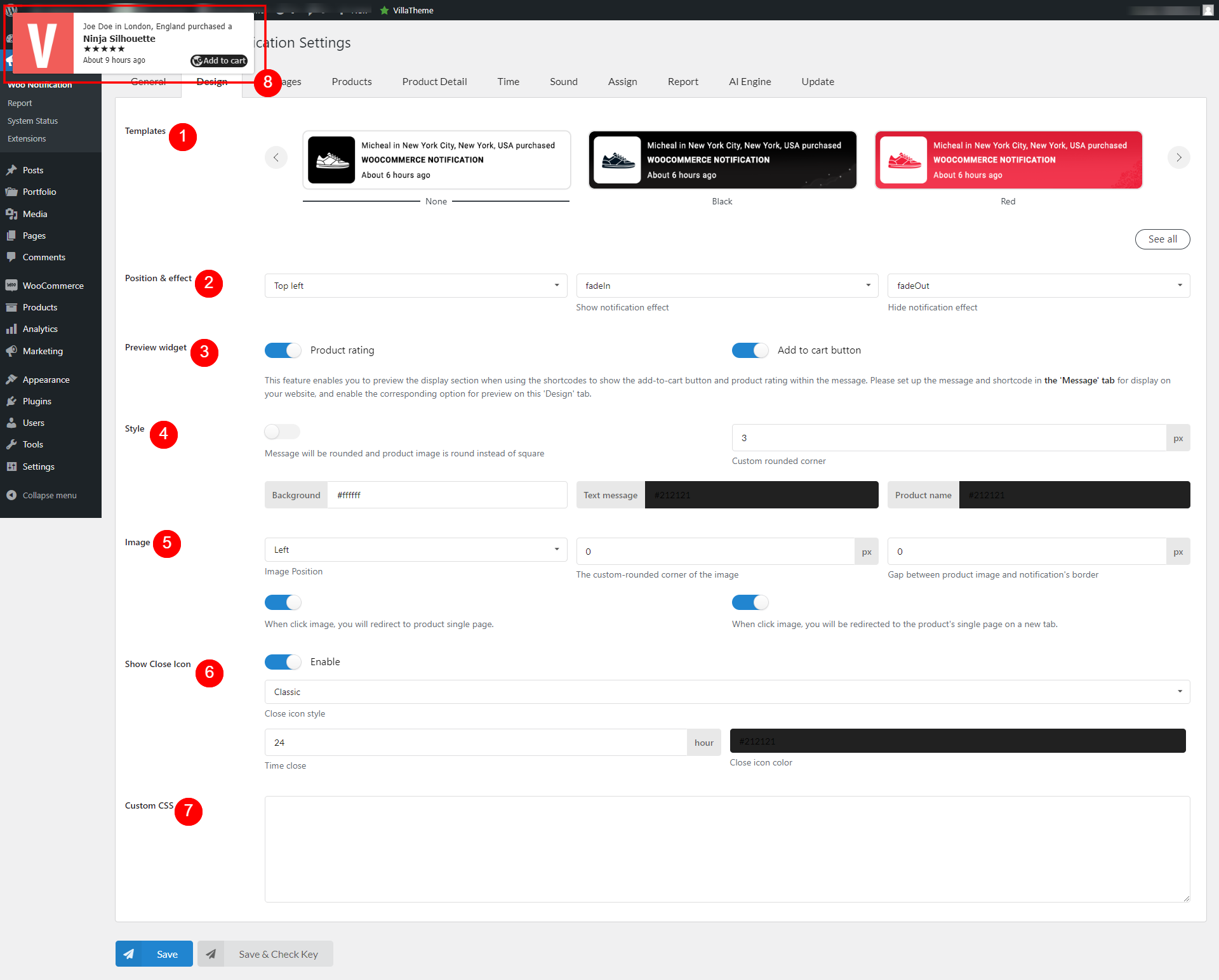
Templates: All built-in templates for notification popup you can choose from. Click the “See all” button for a better view.
Position & effect: Position of the popup and show/hide effects
Preview widget: This feature is for preview purpose only. These 2 widgets below are only visible on front end when you configure the messages under Messages settings with the shortcodes like {product_with_rating}; {product_with_rating_atc}; {product_with_atc} etc.
Product rating
Add to cart button
Style: Some options for popup customization
Option to round the notification popup and product image
Custom rounded corner: If disable the option to round the notification/product image, use this feature to
Background color for notification popup
Text color for message content
Text color for product title
Image: Customize product image on notification popup
Image Position on notification popup
The custom-rounded corner of the image. Use this option to round the product image yourself
Gap between product image and notification’s border
Option to redirect to single product page when clicking the product image
Open the product page on a new tab
Show Close Icon: This is the X button to close the popup
Icon style
Time close – How long the popup will reappear when the user hits the close button
Close icon color
Custom CSS: Add your custom CSS for custom design
Preview: Every change on this setting will reflect on the preview for user’s convenience.