The SMS Settings allow you to send automated text messages related to pre-orders. You can configure these settings under: Dashboard → PRENA → SMS
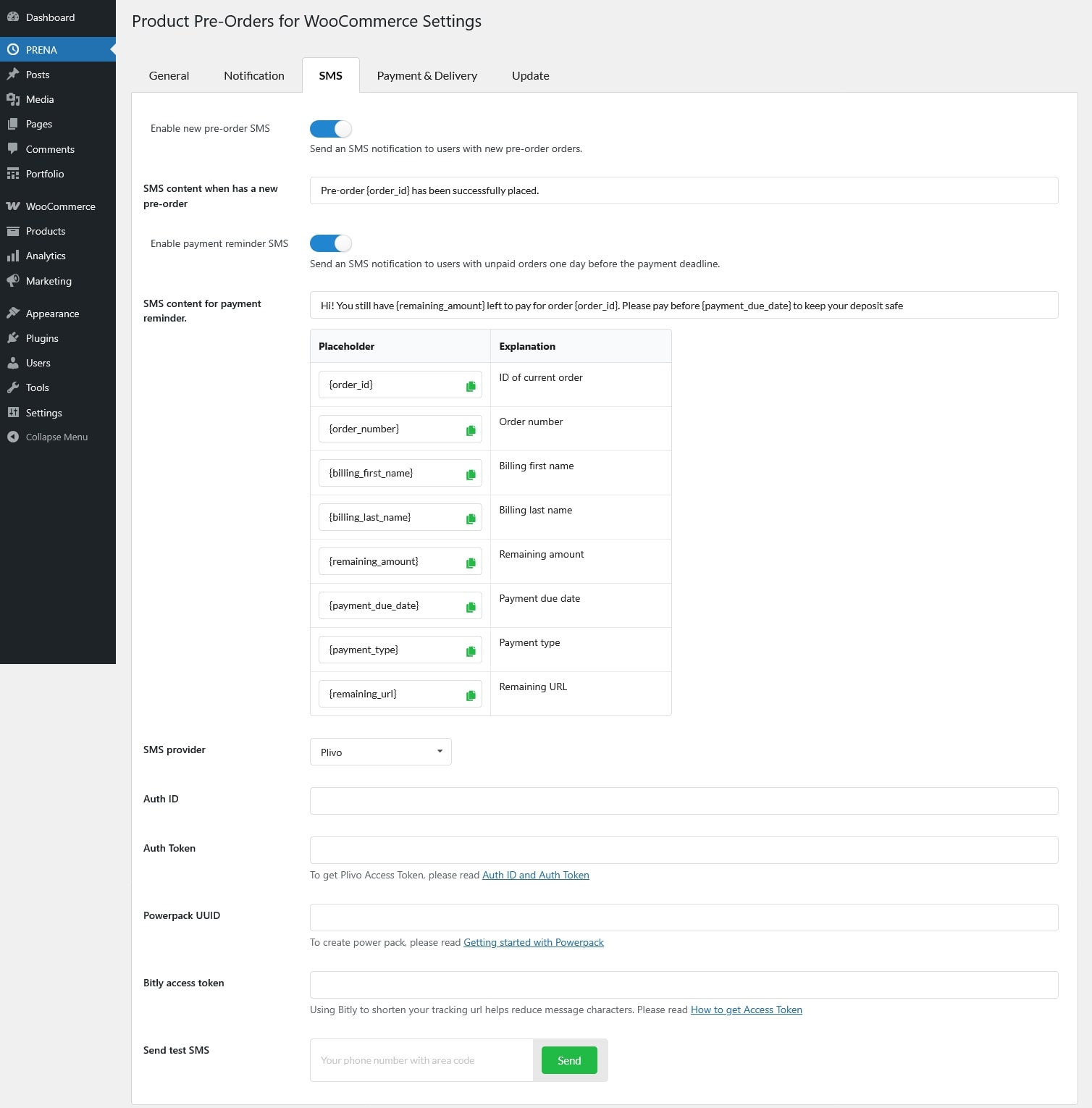
- Enable new pre-order SMS: Enable this option to send an SMS notification when a new pre-order is placed.
- SMS content when has a new pre-order: Enter the message content that will be sent when a customer places a pre-order. You can include dynamic placeholders to display order-related information.
- Enable payment reminder SMS: Enable this option to send an SMS reminder to customers one day before a pre-order payment is due.
- SMS content for payment reminder: Enter the message content for payment reminder notifications. This message will be sent based on the reminder schedule configured in the plugin
- SMS provider: Choose the SMS provider you want to use. Create an account at https://www.twilio.com, https://www.nexmo.com, https://www.infobip.com or https://www.plivo.com, and login to your SMS account.
- Plivo
- Auth ID: You need your Auth ID and Auth Token, you’ll see from the overview page of the Plivo console.
- Auth Token: Get the Auth Token from the Plivo console
- Powerpack UUID: A unique identifier for your application, automatically generated by Plivo. You first need to create a Verify application on the Plivo console.
- Plivo
-
- Nexmo (Vonage)
- From number: The sender phone number that will appear on outgoing SMS messages
- API Key: To get Nexmo API key and token, please read Where can I find my API key and API secret?
- API Secret: To get Nexmo API key and token, please read Where can I find my API key and API secret?
- Enable unicode: Only enable this option if your message contains Unicode characters because Unicode messages can only contain 70 characters, rather than the usual 160. There’s more information about this on the help page
- Twilio
- From number: The sender phone number that will appear on outgoing SMS messages
- ACCOUNT SID: To get this credential, please read this guide
- AUTH TOKEN: To get Twilio Access Token, please read Twilio API: Access Tokens
- Nexmo (Vonage)
- Bitly access token: If your SMS messages include shortened links, you can use Bitly to shorten URLs. Please read How to get Access Token
- Send test SMS: Use this button to send a test SMS using the current configuration.
Supported placeholders for the SMS content:
- {order_id}: ID of current order
- {order_number}: Order number
- {billing_first_name}: Billing first name
- {billing_last_name}: Billing last name
- {remaining_amount}: Remaining amount
- {payment_due_date}: Payment due date
- {payment_type}: Payment type
- {remaining_url}: Remaining URL