The Bulk Edit Review tool allows you to quickly locate and manage specific reviews by filtering any of their properties. You can combine multiple conditions to narrow down exactly the set of reviews you want to update.
How to Filter Reviews
- Click the Filter icon.
- Enter the review properties you want to filter (e.g., ID, Author, Rating, Product, etc.).
- Click the Filter button to apply the conditions.
- View the results – only the reviews matching the selected criteria will be displayed.
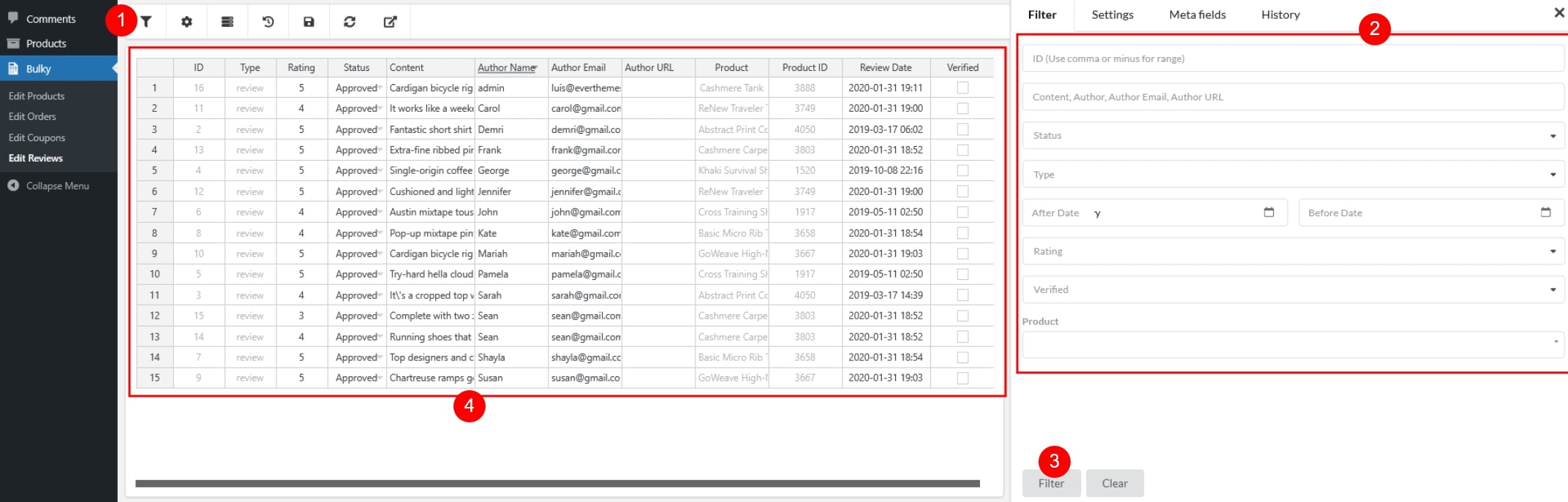
You can filter reviews by:
- ID: target one or multiple specific review IDs, separate IDs with commas or minus for the range
- Content: search by keywords or phrases used in the review text
- Author: filter reviews written by a specific customer name
- Author Email: locate reviews submitted with a particular email address
- Author URL: filter reviews associated with an author’s URL
- Status: choose between approved, pending, or spam
- Type: filter by the review type (review, or reply)
- Review Date: filter reviews by review’s date – After date and before date
- Rating: filter by star rating (1-5)
- Verified: show only verified reviews or non-verified reviews
- Products: filter reviews linked to a specific product
These filtering options help you quickly isolate the exact group of reviews you need to edit, saving time when performing large-scale changes.