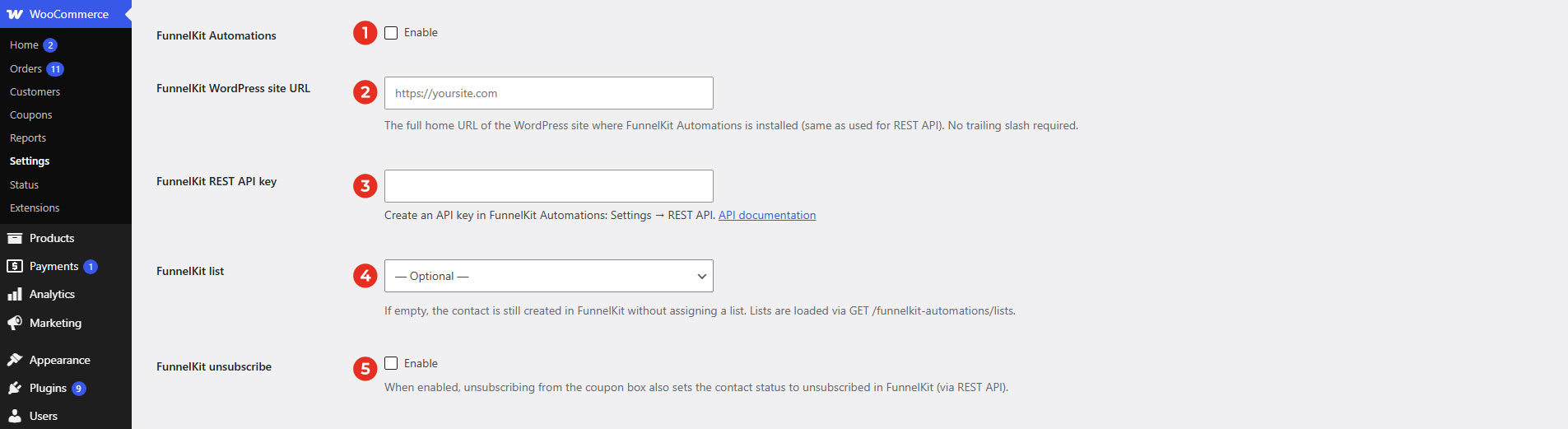
- FunnelKit Automations: Enable/Disable FunnelKit API.
- FunnelKit WordPress Site URL: The full home URL of the WordPress site where FunnelKit Automations is installed. This should be the site’s Home URL (the same URL used by the FunnelKit Automations REST API), including the protocol (https:// or http://). Do not include a trailing slash (/) at the end of the URL.
- FunnelKit REST API key: Create an API Key in FunnelKit Automations then paste them into the corresponding field.
For more information about the FunnelKit REST API, please refer to the official API documentation: FunnelKit Developers Documentation. It includes detailed information about authentication, available endpoints, request parameters, and response examples. - FunnelKit list: Select the FunnelKit list where new subscribers from the Coupon Box will be added.
- If a list is selected, new contacts will be created and assigned to that list.
- If left empty, contacts will still be created in FunnelKit but will not be assigned to any list.
- The available lists are automatically loaded from your FunnelKit site via the REST API.
- FunnelKit unsubscribe: Enable this option to synchronize unsubscribe actions with FunnelKit.
When enabled, if a user unsubscribes from the Coupon Box email list, their contact status in FunnelKit will also be updated to Unsubscribed via the FunnelKit REST API. This helps keep your subscriber status consistent between Coupon Box and FunnelKit Automations.